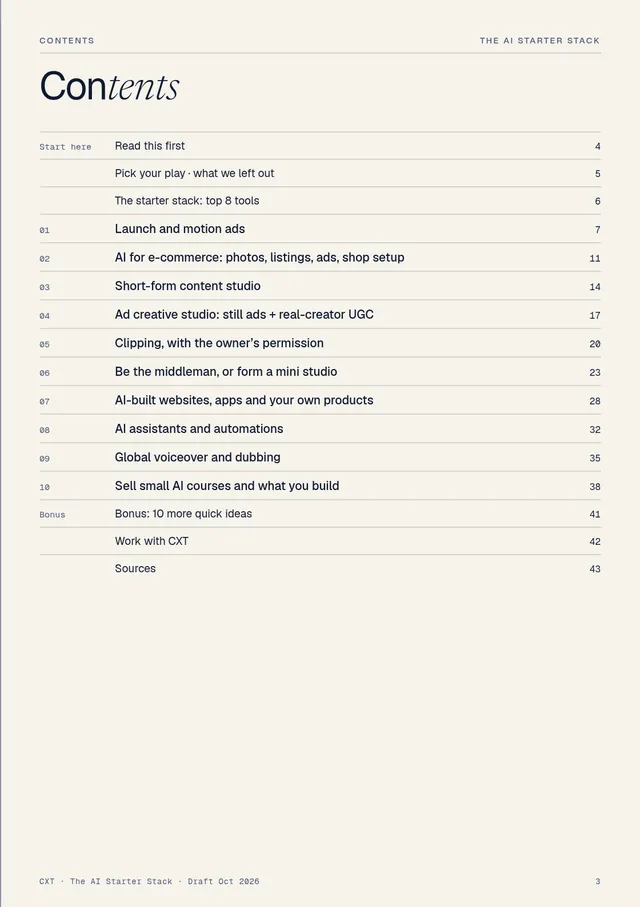
Launch and motion ads
Turn product launches into short, on-brand motion clips for software companies, crowdfunding campaigns and online sellers. This is the lane CXT Studios works in.
What it is
Short clips (usually 10–30 seconds) cut in 16:9, 9:16 and 1:1 for each release: feature reveals, interface walkthroughs, logo stings and “now live” teasers. AI speeds up the scripting, storyboarding and rough motion; your taste does the rest.
Who pays
- Software and AI startups shipping features every few weeks.
- Crowdfunding campaigns (Kickstarter and similar) that need a clearer story while the campaign is live.
- Online sellers launching a product on Amazon, Shopify or Etsy.
Price context
a day: what UK freelance motion designers charge, by seniority. Upwork London: $36–$50/hr. Cited S35
Third-party benchmarks, not what you will earn.
Tools and cost
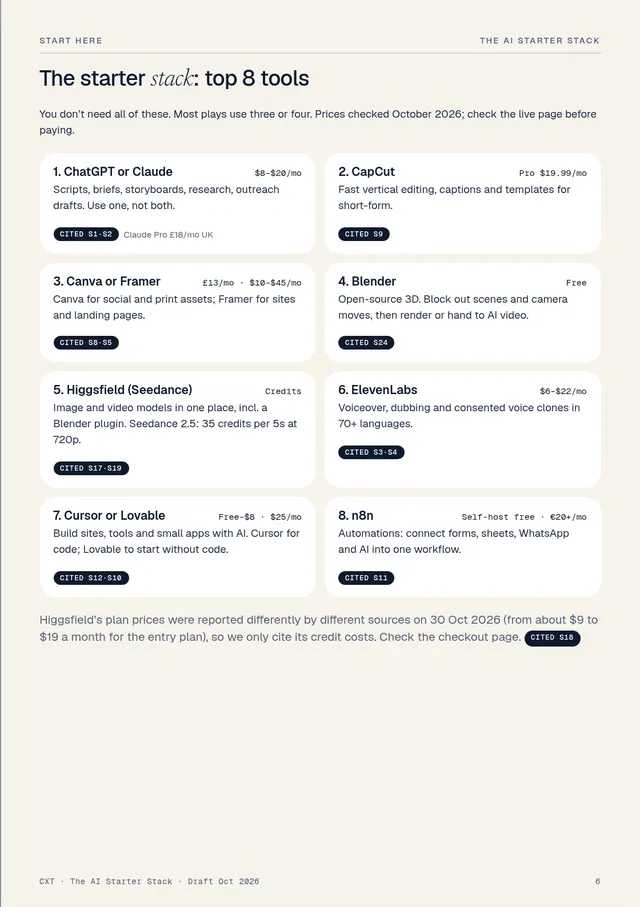
| ChatGPT / Claude | Scripts, storyboards, code for motion | $20/mo · £18/mo UK Cited S1·S2 |
| Higgsfield | Storyboard frames, then animate (Seedance) | Credits: 35 per 5s clip at 720p Cited S17 |
| Remotion | Code-driven motion templates | Free for individuals Cited S2 |
| Blender | 3D blockouts and camera moves | Free Cited S24 |
| ElevenLabs | Voiceover | $6–$22/mo Cited S3 |
| After Effects | Hero polish | If you own it |
| Monthly tools to start | ~$0–$60/mo Estimate | |
Pricing guidance Guidance
Sell a fixed launch pack (for example one hero clip plus two cut-downs), not hours. Estimate the days it will take, check against the day-rate range above for your market and level, then round to a package price. Put revision rounds and delivery formats in writing.
Start this week
- Build one reusable template. Type styles, easing, transitions and a sound bed you can re-skin for any brand.
- Storyboard, then animate. Write a one-paragraph brief, generate about eight key frames as stills, fix them until they read as a story, and only then animate each frame. Use clean, classic motion for digital products and bolder 3D “hyper-motion” for physical ones. Method: Higgsfield S25
- Make 2–3 spec clips from public changelogs or your own product. Label them “spec, not commissioned”.
- Post a breakdown: one release, three formats, and what you changed between storyboard and final.
CXT ran this stack as an internal test: six launch clips from one brief (29 Oct 2026). A test, not client work.
Your first client
- Founders who just posted a release or a changelog.
- Crowdfunding campaigns that are live but under-explained.
- A Contra service listing with your launch pack and spec clips.
- Send 10–15 personal notes with a relevant spec clip, not 200 automated emails. Never let an AI tool send outreach for you. Method: Higgsfield S31·S25
Watch out for
- The “AI look”. Wobbly logos and melting text kill trust. Keep logos, type and UI as real vector or screen recordings.
- Credits burnt on retries. Lock the storyboard first.
- Output licence. Commercial rights depend on your plan; Higgsfield’s free plan isn’t for commercial use. Cited S17
- Brands in spec work. Make clear you aren’t affiliated.
Method credit: Higgsfield AI, “Claude Fable 5 + Higgsfield MCP: My Favorite Business Idea for 2026!” (YouTube, 12 Jun 2026). Summarised, not quoted. Their earnings figures are not repeated here.
Your 30-day scorecard
Blender + AI render
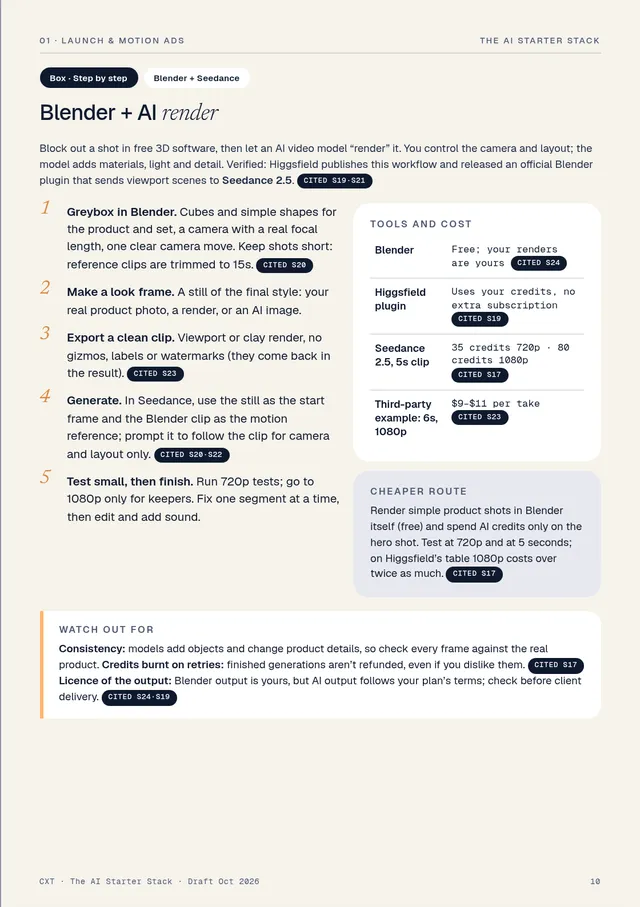
Block out a shot in free 3D software, then let an AI video model “render” it. You control the camera and layout; the model adds materials, light and detail. Verified: Higgsfield publishes this workflow and released an official Blender plugin that sends viewport scenes to Seedance 2.5. Cited S19·S21
- Greybox in Blender. Cubes and simple shapes for the product and set, a camera with a real focal length, one clear camera move. Keep shots short: reference clips are trimmed to 15s. Cited S20
- Make a look frame. A still of the final style: your real product photo, a render, or an AI image.
- Export a clean clip. Viewport or clay render, no gizmos, labels or watermarks (they come back in the result). Cited S23
- Generate. In Seedance, use the still as the start frame and the Blender clip as the motion reference; prompt it to follow the clip for camera and layout only. Cited S20·S22
- Test small, then finish. Run 720p tests; go to 1080p only for keepers. Fix one segment at a time, then edit and add sound.
Tools and cost
| Blender | Free; your renders are yours Cited S24 |
| Higgsfield plugin | Uses your credits, no extra subscription Cited S19 |
| Seedance 2.5, 5s clip | 35 credits 720p · 80 credits 1080p Cited S17 |
| Third-party example: 6s, 1080p | $9–$11 per take Cited S23 |
Cheaper route
Render simple product shots in Blender itself (free) and spend AI credits only on the hero shot. Test at 720p and at 5 seconds; on Higgsfield’s table 1080p costs over twice as much. Cited S17
Watch out for
Consistency: models add objects and change product details, so check every frame against the real product. Credits burnt on retries: finished generations aren’t refunded, even if you dislike them. Cited S17 Licence of the output: Blender output is yours, but AI output follows your plan’s terms; check before client delivery. Cited S24·S19
Sources cited in this chapter (from the book’s list of 55)
- S1ChatGPT pricing (Go $8/mo, Plus $20/mo, US) · chatgpt.com/pricing
- S2CXT AI Opportunity Scan, Oct 2026 (internal research: Claude Pro £18/mo UK, Remotion licence and more) · internal CXT research
- S3ElevenLabs pricing · elevenlabs.io/pricing
- S17Higgsfield, “Higgsfield Pricing Explained” (credit costs per model, refunds, free-plan limits) · higgsfield.ai/blog/higgsfield-pricing-explained
- S19Higgsfield, “Higgsfield for Blender” (plugin, Seedance 2.5 from the viewport), 28 Oct 2026 · higgsfield.ai/blog/higgsfield-blender-plugin
- S20Higgsfield, “Generating with Seedance 2.0” and Seedance reference-to-video API docs · higgsfield.ai/blog/generating-with-seedance-2-0
- S21Higgsfield AI (YouTube): “How To Save AI Credits With Higgsfield + Blender” and “How To Animate a Short Film with Blender + Higgsfield”
- S22Mitte, “How to use Blender with Seedance 2” · mitte.ai/blog/how-to-use-blender-with-seedance-2
- S23Voyager, “Blender previs to photoreal” (third-party cost and time estimate) · voyager.so/blog/blender-previs-to-photoreal
- S24Blender licence and FAQ (free, GPL; your renders are yours) · blender.org/about/license
- S25Higgsfield AI (YouTube), “Claude Fable 5 + Higgsfield MCP: My Favorite Business Idea for 2026!”, 12 Jun 2026
- S31Higgsfield AI (YouTube), “Zero to $13,457/Mo: My 24-Hour AI Agency Experiment”, 29 Jul 2026 (outreach tips only; earnings figures not repeated)
- S35UK freelance rate benchmarks (third-party) and Upwork London motion designers
Excerpt from The AI Starter Stack © 2026 CXT Studios. Not affiliated with or sponsored by Higgsfield or any tool named.